Skip to content
MADE FOR MADRESSAHS

A little less admin.
A lot more learning.

Islamic Studies planned around your teaching year. Quran progress at each child’s own pace. Volunteers, families and school leadership connected in one workspace—built for the way madressahs actually run.

One school. One annual fee.AUD $1,000 · up to 300 students
YOUR SCHOOL, CONNECTED
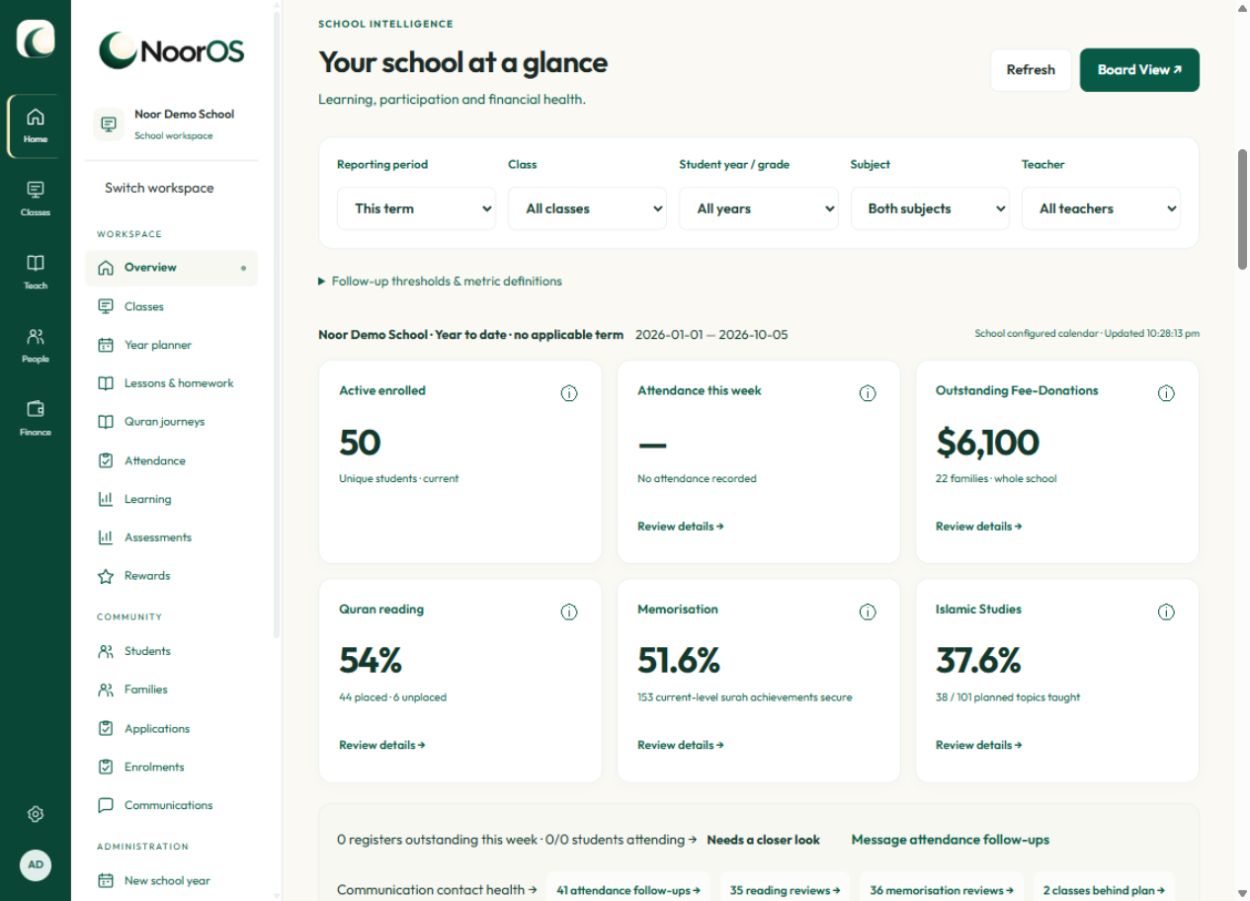
NoorOS demonstration school dashboard with class shortcuts and school statistics

Less chasing information.
More time with your learners.

Enrolments✦Syllabus & Quran progress✦Family communication✦School payments
PURPOSE-BUILT FOR YOUR MADRESSAH

The teaching. The people.
The whole school, connected.

NoorOS brings the details of madressah life together: paired Islamic Studies lessons, individual Quran levels, volunteer development and family Fee-Donations. Each record helps the next person take the right action.

01 / WELCOME

A warmer welcome.
Less paperwork.

Embed your school’s enrolment form on your website. Review each application, choose classes and approve it. Approved information becomes linked family and student records, with parent access prepared through invitations.

02 / TEACH

A clear plan.
Visible progress.

Work from the curriculum assigned to your school. Teachers tick off topics, keep private notes and publish the parts families need to know.

03 / CONNECT

Write an update once.
Keep everyone in the loop.

Publish to the parent portal, then share that same update to your class WhatsApp group. Choose the group and tap Send in WhatsApp.

FROM THE YEAR PLAN TO THE LAST LESSON

Know what’s been taught.
Know what comes next.

A syllabus should be useful every teaching week. NoorOS connects your curriculum to your school calendar, then gives teachers and administrators a shared view of progress.

  • A meaningful plan for the yearPair an Aqaid or History topic with Fiqh or Akhlaq. Review suggested links to nearby Islamic occasions.
  • Your school’s dates, your decisionsAdjust teaching days, term dates, closures and Hijri occasions. Existing plans keep their notes when the calendar changes.
  • Coverage you can act onSee taught topics by subject, spot lessons still to schedule and record notes, homework and parent updates.
See the curriculum planner
ILLUSTRATIVE CLASS PLAN
Grade 2 · Term 2Your next teaching day
AQAID / HISTORY

Leadership & Imamah

Suggested connection: Eid al-Ghadir

Review lesson sequence
FIQH / AKHLAQ

Putting kindness into practice

One main lesson. One practical lesson.

Teacher notes & homework
Plan together. Teach with confidence.

Occasion dates are editable planning estimates until locally confirmed.

ILLUSTRATIVE STUDENT RECORD
One learner, two pathsReading: Level 2
Memorisation: Preliminary
Al-IkhlasRecitation assessedSecure ✓
Al-AsrAyahs 1–2 · pronunciation practicePractising
TEACHER’S NEXT STEP

Revise earlier ayahs before continuing. Check understanding as well as recitation.

A level change keeps the learning history.
A QURAN JOURNEY FOR EVERY CHILD

Same classroom.
Their own pace.

Children don’t progress in a straight line—or all at the same speed. Give teachers a compact, individual record of what each learner can read, memorise and understand.

  • Reading and memorisation, separatelyPlace a child at the right level in each. Move them up or down at any time while keeping earlier assessments.
  • Small details that make the next lesson easierRecord ayahs or pages reached, meaning, vocabulary, private notes and review dates. Find the learners who need revision.
  • A syllabus beside the studentAl-Kawthar level outcomes and the supplied surah plan are available, with Level 1’s four-term reading syllabus. Expand a week to see its lesson, revision and Arabic vocabulary.
Talk to us about your Quran programme
ONE SCHOOL. DIFFERENT RESPONSIBILITIES.

What would make
your school day easier?

Explore the tools that matter to you. The information stays connected, while access follows each person’s school and role.

A CLEAR PICTURE FOR GOVERNANCE

See the school’s direction. Support its next step.

Bring learning, participation and financial health into the same conversation, with an aggregate report prepared by your school leadership.

A report ready for the meeting

Board View brings school indicators into a printable overview, with image export for your board papers.

Learning alongside attendance

Review Islamic Studies coverage, Quran progress and participation together, rather than relying on enrolment numbers alone.

Financial visibility

See collections and outstanding contributions alongside the school’s wider picture. Use Finance for detailed Fee-Donation and waiver reporting.

Useful oversight, less personal detail

Board View omits student, family and teacher identities. Authorised school staff prepare the report; a separate board login is not required.

These tabs describe responsibilities, not additional account types. Each person sees only the records their authorised school workspace allows.

BUILT AROUND VOLUNTEER REALITY

Support the people
who give their time.

A thriving madressah needs more than a staff list. Give each teacher a clear start, a supported path into the classroom and development that respects their capacity.

  • Your own onboarding checklistAdapt tasks for your school: WWCC, CV review, contact details, commitment and induction. Keep assistant rotations and review dates together.
  • Continuing education at an individual paceRecord eHawza or approved equivalent study, progress notes and agreed check-ins. Follow up without imposing a fixed hours or semester quota.
  • Know when to check inSee WWCC and development follow-ups in school summaries and Data Health. Use the volunteer attendance record to inform personal recognition.

School staff maintain and review these records. NoorOS does not verify checks with an authority or synchronise study progress with eHawza.

AN ADAPTABLE TEACHER JOURNEY
1

Welcome

Complete your school’s checklist

2

Assist

Rotate through classes with a mentor

3

Review

Discuss readiness and the next opportunity

4

Keep growing

Record study progress and agree the next check-in

Six months assisting is the starting suggestion. Your school can change the period and each teacher’s review date.

THE DETAILS THAT KEEP A SCHOOL RUNNING

From the first application
to the next school year.

Explore the practical tools behind the learning. Open a section for a closer look.

01Welcome familiesApplications, records and access

Online admissions

An embeddable school form, review, requests for more information and approval before active enrolment.

Reviewed imports

CSV and Excel imports with column mapping, explicit matching and a preview before records are created.

Connected profiles

Student photos, linked family profiles, searchable contacts and individual guardian access.

02Run the teaching weekAttendance, learning and communication

Student and volunteer attendance

Photo-supported student registers and a single-page teacher roll, with present, late and not-expected options.

Learning and recognition

Syllabus coverage, individual Quran tracking, assessments and rewards alongside the existing class records.

Targeted communication

Class, attendance, learning and Fee-Donation audiences; drafts, templates, recipient previews and scheduled messages.

03Manage contributions with careFee-Donations, payments and waivers

Your school’s payment connection

Use your own Stripe account, record cash, and reconcile bank transfers before counting them as received.

Room for individual circumstances

Record a concession, scholarship or waiver against all or part of a balance. Retain the original record and adjustment history.

Useful financial records

Invoices, receipts, family statements, outstanding balances and follow-up notes, with access restricted by role.

04Keep the school moving forwardOversight, continuity and your identity

A deliberate year rollover

Review next-year classes and placements before activation; preserve student identities, earlier records and Quran journeys.

Activity and Data Health

Review important recorded changes and actionable data issues, including teacher-check and study follow-ups.

Your school, your workspace

Your logo, colour and contact details; assigned curriculum packages and separate access for each school.

MEET YOUR NEW WORKSPACE

Thoughtfully simple.
Ready for the real school day.

Explore actual NoorOS screens below. All names and records shown are demonstration data.

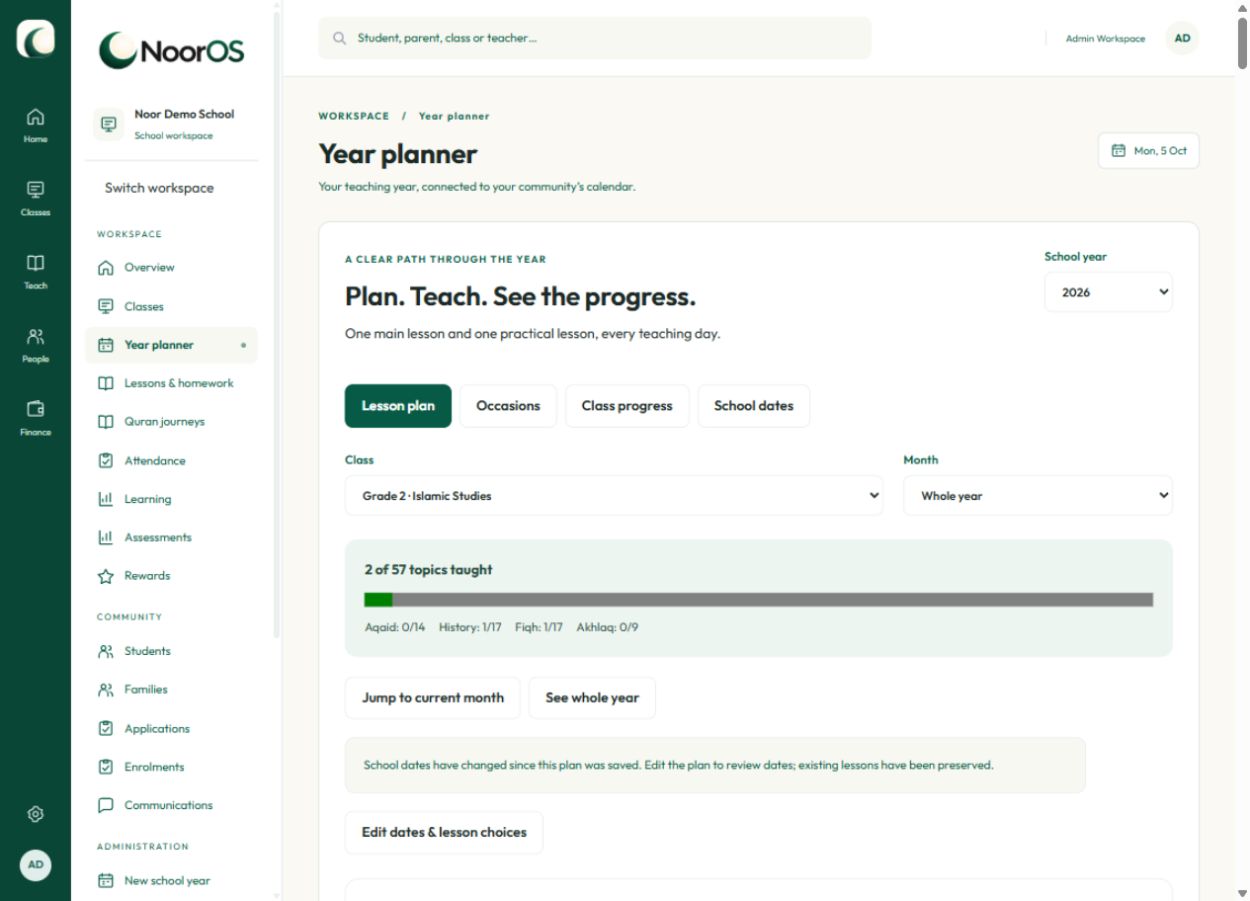
Paired lessons, editable school dates and subject progress in one year planner. Demonstration account.

See the teaching year take shape.

Paired lessons, editable school dates and subject progress in one year planner.

View full screen
YOUR SCHOOL. YOUR APPROACH.

A curriculum that fits
your community.

NoorOS supports your chosen teaching programme. We assign the relevant curriculum packages to your school, then your teachers select the topics they need and record their progress.

Your logo, school colour and contact details help make the workspace feel like home.

Tell us what your school teaches
BUILT TO SERVE. PRICED TO BE SIMPLE.

More for your school.
Less complexity.

One predictable annual fee for schools with up to 300 students. No extra per-student charge within your plan.

AUD $6.67 per student, per year

The school pays the flat annual fee; this is an illustration, not a separate student charge.
THE SCHOOL PLANUp to 300 students
AUD$1,000/ year

Learning, people and school operations, together.

  • School, teacher and parent workspaces
  • Online applications and approval
  • Year planning and syllabus progress
  • Individual Quran reading and memorisation
  • Student and volunteer attendance with follow-up
  • Teacher onboarding, WWCC and study records
  • School analytics and aggregate Board View
  • Communications, homework and parent updates
  • Fee-Donations, waivers and your Stripe connection
  • Reviewed imports and school-year rollover
  • Your school’s logo and colour
Ask about getting started

Card processing fees are charged separately by your payment provider. Curriculum content and any third-party licensing are agreed during setup.


More than 300 students? Let’s talk
A NOTE ON WHERE WE COME FROM

Built with a madressah
leader’s perspective.

Dr Abidali Mohamedali Founder, NoorOS

With over 15 years of experience running madressahs, Dr Abidali Mohamedali is principal of the Imam Husain Islamic Centre madressah and has helped establish and support several others. His work with Kisa Foundation brings an understanding of the different curricula communities use.

NoorOS grows from a simple aim: give schools practical tools at an accessible cost, and give their people more time for learning.

A FEW THINGS YOU MIGHT WONDER

Good questions.
Clear answers.

Can a teacher also be a parent, or belong to another school?

Yes. One email identity can have separately authorised school and role memberships. People switch workspaces; access is not combined across schools or roles.

Does Board View expose student records?

Board View is an aggregate report prepared by authorised school staff. It omits student, family and teacher identities and can be exported for a board meeting. It does not add a separate board login.

Can we waive a family’s Fee-Donation?

Yes. Authorised staff can waive all or part of the remaining balance and keep an adjustment record. A waiver reduces what is outstanding; it is not counted as a payment received.

Can students move Quran levels during the year?

Yes. Reading and memorisation have independent levels. Teachers can move a learner up or down, record why and keep earlier progress. Weekly reading lessons and surah attainment are assessed separately for each child.

How does our school get started?

Send an inquiry below. We’ll discuss your school, set up its branding and administrator account, and agree the curriculum packages you need. Your administrator then adds teachers, families, students and classes.

Can we put the enrolment form on our existing website?

Yes. Your school administrator can enable applications and copy an iframe embed code. Applications wait for review; active records and class enrolments are created only when approved.

Do families need to remember another password?

No. Registered administrators, teachers and parents request a one-time sign-in link by email. The link expires after 15 minutes and can be used once.

Does NoorOS send directly to our WhatsApp groups?

The teacher publishes a parent update in NoorOS and uses the sharing button to open WhatsApp. They choose the class group and send it there. NoorOS does not automatically post to groups or confirm delivery.

Can each school accept its own card payments?

Yes. Each school connects its own Stripe account in Settings. The school controls its fees and its payment connection. Payment-provider charges are separate from the NoorOS annual fee.

Is there an app to install?

No installation is required. NoorOS is a browser-based workspace with layouts for desktop and mobile.

Which curricula are included?

We’ll discuss the curriculum your school uses and make agreed lesson topics available to its teachers. Content and any publisher licensing are agreed during setup.

LET’S BUILD A BETTER SCHOOL DAY

Tell us about
your community.

Starting a madressah, bringing an established school online, or supporting more than 300 students? We’d love to hear what you need.

enquiries@nooros.org
NoorOS | More time for learning